Free Cycling Route Planner & GPX Editor
Plan road-snapped cycling routes, import and edit GPX files, add waypoints, and export with real terrain elevation data — all in your browser, free to use. You can use it without an account, or sign in if you want to save routes to your account and share a public link.
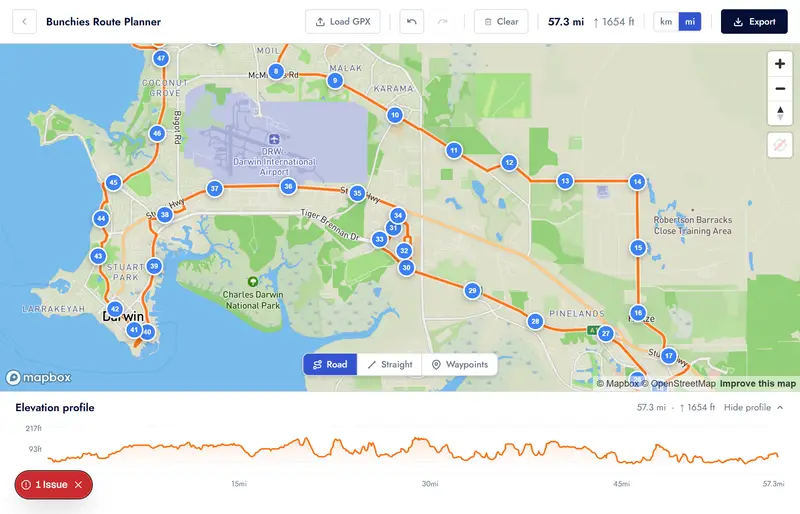
Everything you need
A free GPX route creator built for cyclists
Easy to use and works on mobile devices. Powered by Mapbox - choose between map and satellite view.
Road-snapped routing
Click points on the map and the route automatically snaps to roads and cycling paths via Mapbox Directions — no manual tracing.
Straight-line mode
Switch to straight-line segments for canal towpaths, alleyways, and off-road shortcuts where road-snapping doesn't apply.
Named waypoints
Drop named waypoints with descriptions along your route — perfect for marking coffee stops, meeting points, or tricky junctions.
GPX import & edit
Load any existing GPX file and edit it directly. Control points are sampled from the track so you can drag, delete, or extend the route.
GPX export with elevation
Export your finished route as a GPX file with real terrain elevation data sampled from the Mapbox DEM — ready for your Garmin, Wahoo, or Komoot.
Save routes & share links
Sign in to save a route to your account, reopen it later for editing, and share a public route page instead of sending files around.
Elevation profile
A live elevation chart updates as you build your route, showing total distance, climbing, and descent at a glance.
Full undo / redo
Made a wrong turn? Hit Ctrl+Z. Every edit is tracked in a full history so you can step back and forward through your changes freely.
Create a ride in one click
Happy with your route? Convert it straight into a Bunchies ride listing with the GPX pre-loaded — no re-uploading or copy-pasting.
How it works
Build a route in minutes
Click to build
Open the planner and click points on the map. The route snaps to roads automatically. Switch to straight-line mode for off-road sections.
Refine & annotate
Drag control points to adjust the line. Insert new points mid-segment. Add named waypoints for stops, meeting places, or highlights.
Export or share
Download a GPX file ready for your GPS device, or convert the route directly into a Bunchies ride listing to share with the community.
GPX editor online
Import, edit, and re-export any GPX file
Already have a GPX file from Strava, RideWithGPS, Komoot, or your GPS device? Load it straight into the Bunchies route planner. Control points are sampled from the track so you can drag, delete, and extend the route however you like, then re-export with accurate terrain elevation baked in.
- Accepts GPX files from any device or app
- Bulk upload existing GPX files
- Named <wpt> elements imported as waypoint pins
- Edit, extend, or trim the existing route
- Re-export with Mapbox terrain elevation
- GPX filename derived from your route name
FAQ
Common questions
Is the cycling route planner really free?
Yes, it is free to use without needing to create an account or login. There are generous limits for route generation. You can sign up for a pro account if you want to use more advanced features.
Do I need to sign up or log in?
No. The route planner is fully accessible without an account. If you want to save routes to your account, share a public route link, or convert a route into a Bunchies ride listing you will need to sign in, but planning and GPX export are always free and anonymous.
What GPX files can I import?
Any valid GPX file. Files exported from Strava, RideWithGPS, Komoot, Garmin Connect, Wahoo, and most other cycling apps and devices work fine. Named waypoint elements (<wpt>) are imported as editable pins.
How accurate is the elevation data in the exported GPX?
Elevation is sampled from the Mapbox Terrain DEM at export time. This gives real terrain elevation at each track point — more accurate than many GPS recordings, which can drift. It is not a substitute for a calibrated altimeter but is reliable for planning.
Can I use the GPX file on my Garmin or Wahoo?
Yes. The exported GPX is a standard format compatible with Garmin, Wahoo, Hammerhead Karoo, and any device or app that accepts GPX route files.
What is straight-line mode?
When road-snapping is not appropriate — canal towpaths, private alleyways, gravel tracks, ferry crossings — switch to straight-line mode. Clicks draw direct segments between points instead of following the road network.
Can I share my route with others?
Yes. You can always export the GPX and share the file directly. If you sign in, you can also save the route to your account and share the public route page URL. You can still convert the route into a Bunchies ride listing if you want a ride page instead of a route page.
Start planning your next ride
Free, no login required. Open the planner and start clicking — then sign in if you want to save routes to your account and share public links.
Open the free route planner